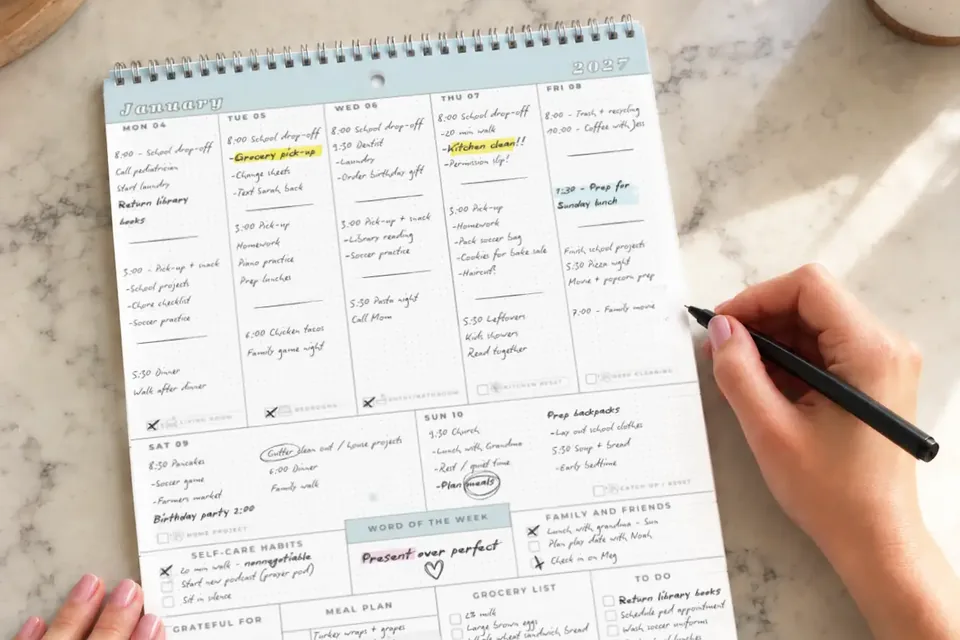

The practice time changes in a group text. The dentist reminder pops up on your phone. Meanwhile, your child is asking what’s happening tomorrow, and the rest of the family can’t see the plan.
Here’s the short answer: choose a digital calendar if schedules change often and adults need instant updates. Choose a wall calendar if your biggest problem is getting everyone to see the week and take part. Use both only if you can keep them in sync without creating another job for Mom.
Wall calendar vs. digital calendar at a glance
| Your family’s need | Wall calendar | Digital calendar |
|---|---|---|
| See the whole week without opening a device | Strong | Requires a screen |
| Changes while away from home | Needs manual update | Easy to edit and share |
| Reminders before events | No automatic alerts | Available when reminders are enabled |
| Alerts when someone edits an event | Update everyone yourself | Depends on the service and plan |
| Help younger kids see tomorrow | Visible at their height | Usually needs adult help or a shared device |
| Meal plans and household tasks beside appointments | Available on some planners | Depends on the tool and setup |
| Start with no new subscription | Possible with paper you already have | Possible with free options |
Digital isn’t automatically expensive: Google’s family calendar lets people with access edit shared events and configure event reminders. It does not send notifications by default when someone adds, edits or deletes a family event. Cozi offers a free shared family calendar and optional paid tiers; its automatic calendar-change notifications are listed under Cozi Gold. Paper can be free, too, or cost money if you buy a printed planner. Check the reminder and update-alert features you actually need, rather than assuming every digital calendar works the same way.
The Real-Life Version
Try the same busy week in both formats
Imagine a family with two kids: school every weekday, soccer on Tuesday, a dentist visit Wednesday, and a Friday field trip requiring a permission slip.
- Digital-only: Put all four events in one shared calendar. Give the adults edit access, set Wednesday and Friday event reminders, and update soccer if the coach changes the time. Check who will see the changed time, because a calendar edit is not necessarily a push alert. Best when the adults already check their phones and the children don’t need to read the plan independently.
- Wall-only: Write the events where the family walks past each day. Add “Dad drives” beside soccer and “bring signed slip” beside Friday. Best when the schedule is fairly stable and the family needs an obvious shared reference.
- Hybrid: Put time-sensitive appointments and updates in the shared digital calendar. During a short weekly check, copy only the coming week’s family-facing commitments onto the wall, along with rides, dinners and who is responsible. Agree who updates the shared wall plan, but have the person who receives a same-day change tell everyone affected immediately.
Don’t maintain two full calendars line by line. If the wall copy is constantly outdated, digital-only may be the better choice.
Which setup should you choose?
- Choose digital-only if multiple adults arrange pickups from different locations, plans change often, and everybody who needs the schedule can access it.
- Choose wall-only if you’re after a visible weekly plan, have fewer last-minute changes, and are happy updating by hand.
- Choose hybrid if the adults need digital coordination but the household needs to see dinners, rides and responsibilities without asking.
- Don’t switch yet if your current system works and the proposed alternative just creates duplicate entry.
A quick decision test: If a child asks “What’s tomorrow?” without a phone, can they find the answer? If a coach changes practice at 2 pm, can everyone driving find out before pickup? Choose the format that handles the problem your household actually has, not the one with the longest feature list.
For a family starting from scratch, test the free options first. A basic shared digital calendar or an ordinary sheet of paper can reveal what you actually need before you buy anything.
When Life Happens
When plans change after you've written the week
Practice moves to Thursday? Change the digital event first if that’s where the update arrived. Then change the wall entry at the next family check, or immediately if someone is relying on it today.
The wall and phones disagree? Pick one authoritative place for appointment times, and tell everyone which one wins until you reconcile them.
Nobody checks either calendar? Try a five-minute look together after dinner. The habit matters more than the format.
For the bigger picture, start with a simple system for organizing your family’s week. For the calendar setup, see how to organize a family calendar everyone actually uses or build a home command center. If one adult is still managing every detail, start with sharing the mental load at home.
Your Next Small Win
Ask everyone who manages or follows the family schedule one question tonight: “Where would you look to find out what’s happening tomorrow?” Let their answers guide your choice.